Almost every accounting firm has already tried some form of OCR. And almost every one tells the same story: "We tried it, but it didn't work. It got the amounts wrong, didn't recognise half the invoices, and in the end it was slower than typing them in by hand."
The problem is usually not the idea of reading documents automatically, but the kind of OCR that was used. The difference between traditional (template) OCR and AI OCR is so large that they are really two different technologies that happen to share a name. In this article we explain where old OCR fails, what makes AI-driven OCR different, and what that means for an accounting firm that handles thousands of documents a month.
What is OCR?
OCR (Optical Character Recognition) is a technology that turns an image of text (a scanned invoice, a phone photo, a PDF) into machine-readable text. The idea has been around for decades, and in its basic form it does a good job at a simple task: "take this image and give me the letters and numbers in it".
The problem for accounting is that an invoice is not just text. It is a structure: supplier, company ID, number, date, line items, tax base, VAT, total. Recognising the letters is the easy part. The hard part is understanding what is what. And this is exactly where the two approaches part ways.
Traditional OCR: how it works and where it fails
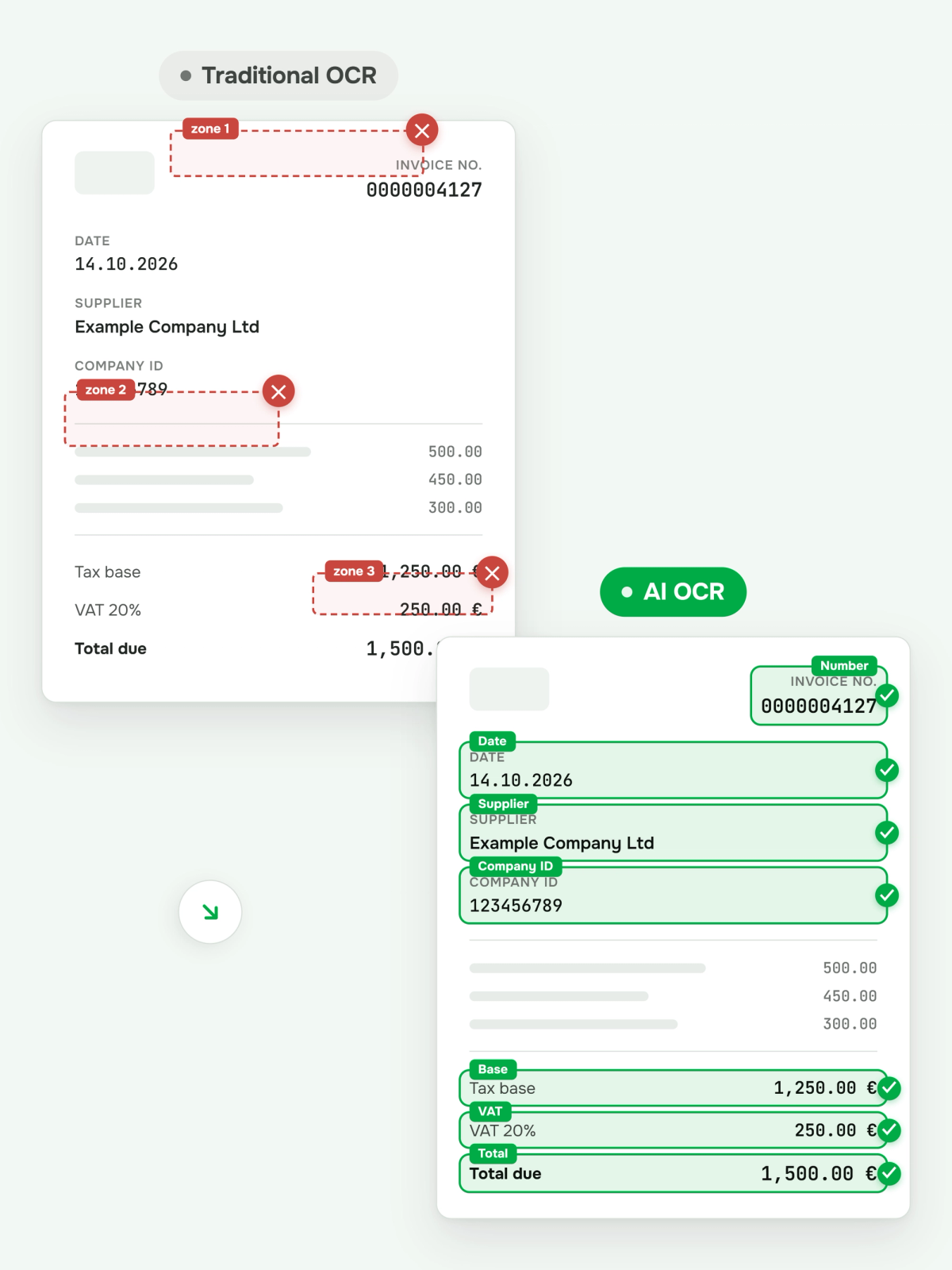
Traditional document OCR works on templates and zones (template / zonal OCR). You set the system up in advance: "the total is in the bottom right corner", "the invoice number is top right", "the VAT is in this cell". For one specific, recurring format this even works reasonably well.
The problems start in the real world of an accounting firm:
- Every supplier has a different format. Hundreds of clients mean thousands of different invoice layouts. You cannot maintain a template for each one.
- It breaks at the smallest change. The supplier moves the logo, adds a line or changes the design. The template stops working.
- It does not understand context. Traditional OCR sees "1 250.00" but does not know whether it is a unit price, a subtotal or the total. It reads characters, not meaning.
- It is weak with handwriting and poor quality. A crumpled till receipt, a photo taken at an angle, faded thermal print. Accuracy drops sharply.
- It struggles with languages and special characters. Cyrillic, diacritics, mixed languages in one document: frequent sources of errors.
The end result is the familiar picture: the system "works" in a demo with clean invoices, but in real use it needs so many manual corrections that the time saved disappears. That is where the disappointment "OCR doesn't work for accounting" comes from.
What is AI OCR (intelligent document processing)
AI OCR, or more precisely intelligent document processing (IDP), approaches the problem from a completely different angle. Instead of predefined zones, it uses AI models trained on huge numbers of documents, which understand the document as a whole, the same way a person does.
The difference is fundamental: traditional OCR asks "what characters are in this cell?", while AI OCR asks "what is this document and what is its data?". That is why AI OCR:
- recognises fields by meaning, not position: it finds the "total" wherever it sits on the page;
- works with any layout without setting up a template for each supplier;
- tolerates handwriting, noise and poor quality much better;
- understands many languages, including Cyrillic and mixed documents;
- returns structured output: ready fields (supplier, company ID, date, amount, VAT, line items), not just "a pile of text";
- improves itself: when the team fixes a mistake, the system learns and is more accurate next time.
Comparison: traditional OCR vs AI OCR
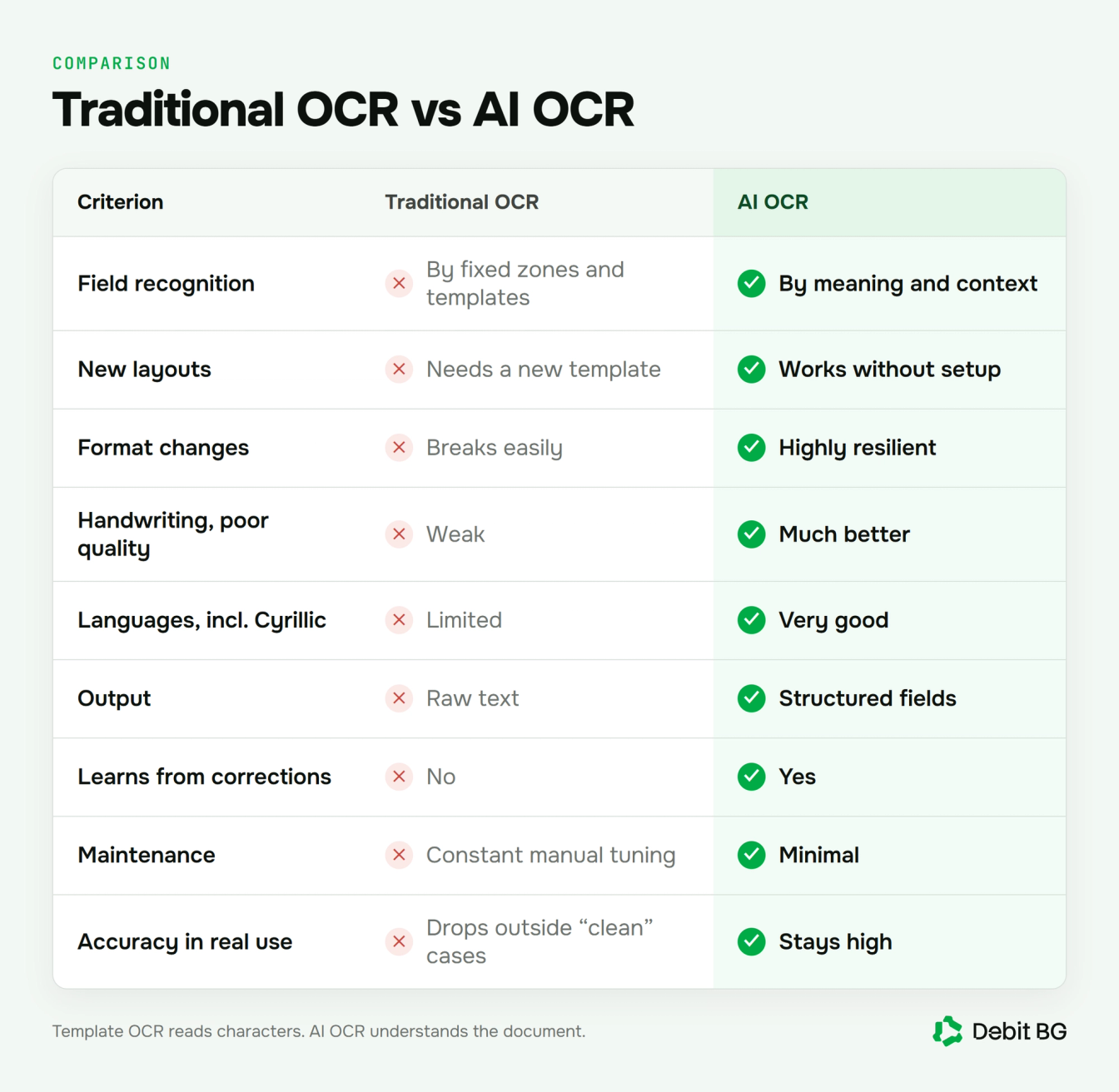
- Field recognition. Traditional OCR: by fixed zones and templates. AI OCR: by meaning and context.
- New or different layouts. Traditional OCR: needs a new template. AI OCR: works without setup.
- Resilience to format changes. Traditional OCR: breaks easily. AI OCR: highly resilient.
- Handwriting and poor quality. Traditional OCR: weak. AI OCR: much better.
- Languages (incl. Cyrillic and mixed). Traditional OCR: limited. AI OCR: very good.
- Output. Traditional OCR: raw text. AI OCR: structured fields.
- Learning from corrections. Traditional OCR: none. AI OCR: yes.
- Maintenance. Traditional OCR: constant manual tuning. AI OCR: minimal.
- Accuracy in real use. Traditional OCR: drops outside the "clean" cases. AI OCR: stays high.
Why this matters for an accounting firm
For a firm that handles thousands of documents a month, the difference between the two approaches is measured directly in hours and errors.
Works with any document and language. Because DebitBG uses AI OCR rather than rigid templates, the platform reads a wide range of documents: invoices, customs declarations, debit and credit notes and much more. It also recognises languages from all over the world with ease, including every European language. So the team reviews only the exceptions, not every document.
No templates to maintain. You take on a new client with a new supplier and the system simply works. No zones to set up for each new invoice.
Less manual work, more expertise. When reading is automatic and accurate, the accountant stops typing in data and focuses on what clients really pay for: analysis, advice, correct reports.
The system gets better over time. Every correction your team makes makes the models more accurate for your specific clients and suppliers. Traditional OCR never learns; AI OCR does with every use.
Fewer errors downstream. Accurate extraction means fewer swapped amounts and wrong company IDs, which would otherwise only surface in VAT returns or an audit.
Limits and how to manage them
AI OCR is powerful, but it is not magic. It is important to roll it out sensibly:
- No system is 100% on every document. That is why a good workflow always includes an exceptions queue: doubtful cases are flagged for human review instead of quietly going through with an error.
- Human in the loop. The accountant stays in control. The AI does the routine; the expert confirms and corrects.
- It learns from you. In the first weeks with a new client, the system gets to know their suppliers. The more you correct at the start, the less you will correct later.
- Audit trail. In accounting, every extraction and every correction must be traceable. Look for a system with a clear audit log.
DebitBG is built on exactly this model: AI processes the documents automatically, and your team sees only the exceptions in the queue, with a full audit trail behind every action.
How DebitBG uses AI OCR
DebitBG is a complete accounting solution powered by AI. Documents come in, get posted and are reconciled with the bank in one system, with no transfer to another program. AI OCR is the heart of the platform:
- Capture. Documents arrive automatically from email inboxes, bank data (through open banking) and other sources.
- Reading. AI extracts the fields with high accuracy, whatever the format, language or quality of the document.
- Posting. Every transaction goes to the right account in the client's own chart of accounts, based on learned patterns. You correct it once and DebitBG remembers.
- Reconciliation. Bank payments are matched to invoices, and the client's books are kept in DebitBG. If your firm works with MicroInvest, the data goes there in one click.
The result is the difference between "we tried OCR and it didn't work" and an accounting process where the machine does the tedious part and your team does the interesting one.
See AI OCR on your invoices
Stop typing invoices by hand and maintaining templates that break. DebitBG reads your clients' documents with AI, posts them to the right accounts and keeps their books in one system.
Book a demo →Frequently asked questions
What is the difference between OCR and AI OCR?
Traditional OCR recognises characters using predefined templates and zones. AI OCR (intelligent document processing) uses artificial intelligence to understand the document by meaning, work with any layout and return structured data.
Why does traditional OCR fail with invoices?
Because it relies on fixed templates. Every supplier has a different format, and every layout change breaks recognition. It also does not understand context: it sees numbers but does not know which one is the total.
How accurate is AI OCR?
With modern solutions, field-level extraction accuracy exceeds 99%. DebitBG uses exactly this AI OCR approach and keeps accuracy high across a wide range of documents (invoices, customs declarations, debit and credit notes and more) in languages from all over the world.
Does AI OCR work with Cyrillic invoices?
Yes. Unlike many traditional OCR solutions, modern AI OCR understands Cyrillic and even mixed languages in one document.
Does AI OCR replace the accountant?
No. AI OCR automates routine data entry, and the accountant stays in control: reviewing the exceptions, confirming and advising the client.
Does the system learn from our corrections?
Yes. With AI OCR, every correction makes the models more accurate for your specific clients and suppliers. Traditional OCR does not learn by itself.